
vision-language models fine-tune with the same environment contract as text models; images just travel as standard openai content parts. two things make an environment multimodal:
- image prompts: a message’s
contentcan be a list of parts mixingtextandimage_url(https urls or data uris) instead of a plain string - image tool results:
run_toolcan return content parts too, so a tool call can put a new image in front of the model mid-rollout
this guide walks through geo3k, a complete multimodal environment in the benchmax repo. it trains a model to solve geometry problems from diagrams, with a zoom tool for magnifying unclear regions. the dataset is public, so you can run it end to end without uploading anything.
the task
each example pairs a geometry diagram with a question. this one asks the model to find the missing chord segment:
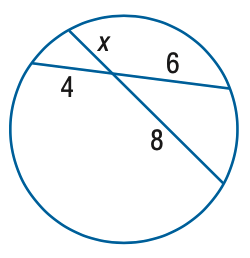
the model reads the diagram, may call zoom, and answers with \boxed{...}:
user: [diagram] Find x.
tool: zoom(x0=0.0, y0=0.0, x1=0.7, y1=0.5) → [magnified crop of the labeled segments]
assistant: intersecting chords, so x · 8 = 4 · 6 ... \boxed{3}
image prompts
create_dataset resolves the public chenhegu/geo3k_imgurl hugging face dataset at runtime and maps each row to an Example whose user message carries the diagram as an image_url part ahead of the question text:
content = [
    {"type": "image_url", "image_url": {"url": image_data_uri}},
    {"type": "text", "text": problem},
]
prompt_messages = [
    {"role": "system", "content": system_prompt},
    {"role": "user", "content": content},
]
that’s the whole multimodal dataset story: same prompt_messages payload as any environment, with content parts instead of a string. see dataset for the surrounding Example contract.
an image-returning tool
zoom takes normalized crop coordinates and returns the crop as an image part followed by a text caption. vision chat templates render the image_url part as real image tokens, so the model actually sees the magnified region:
async def run_tool(self, rollout_id, tool_name, **tool_args):
    crop = self._crop(self._images[rollout_id], tool_args)
    return [
        {"type": "image_url", "image_url": {"url": to_data_uri(crop)}},
        {"type": "text", "text": "Zoomed view of the requested region."},
    ]
two details worth stealing:
- the
rollout_contexthook loads each rollout’s base diagram once and releases it afterwards, sincerun_toolreceives only the rollout id, not the example - the crop is upscaled so its long edge matches the original image; that’s what makes small labels legible rather than merely reframed
keep tools optional where you can. geo3k’s reward never checks whether zoom was called, so training reinforces zooming only where it actually helps.
reward
nothing vision-specific: extract the final \boxed{...} answer from the transcript and compare it to the ground truth.
async def compute_reward(self, rollout: BaseRollout) -> RewardMap:
    predicted = final_boxed_answer(rollout.messages)
    return {"correctness": float(predicted == rollout.example_args["answer"])}
validate and launch
from the example directory:
cd examples/geo3k
uv run python main.py validate   # sample rollouts, locally and in a hosted sandbox
uv run python main.py launch     # asks for confirmation before spending gpu credits
pick a vision-language model (the example trains Qwen/Qwen3-VL-4B-Instruct; Qwen/Qwen3-VL-30B-A3B-Instruct is the larger option) and list the packages your dataset loading needs in pip_dependencies (here datasets and pillow). the launch caps at 256 training and 32 evaluation examples for a fast first run.
other multimodal examples
dominant-color scores multi-turn visual memory and qwen3-ocr-reverse shows a single-turn setup with uploaded images. see the benchmax examples for the full list.