
the console gives you three ways to evaluate your model: the eval tab (held-out metrics), benchmarks (head-to-head against other models), and the playground (interactive testing).
eval tab
the eval tab shows the same metrics as the train tab (average reward, max reward, solve rate), but computed on your held-out evaluation dataset. this is the primary way to check for overfitting.
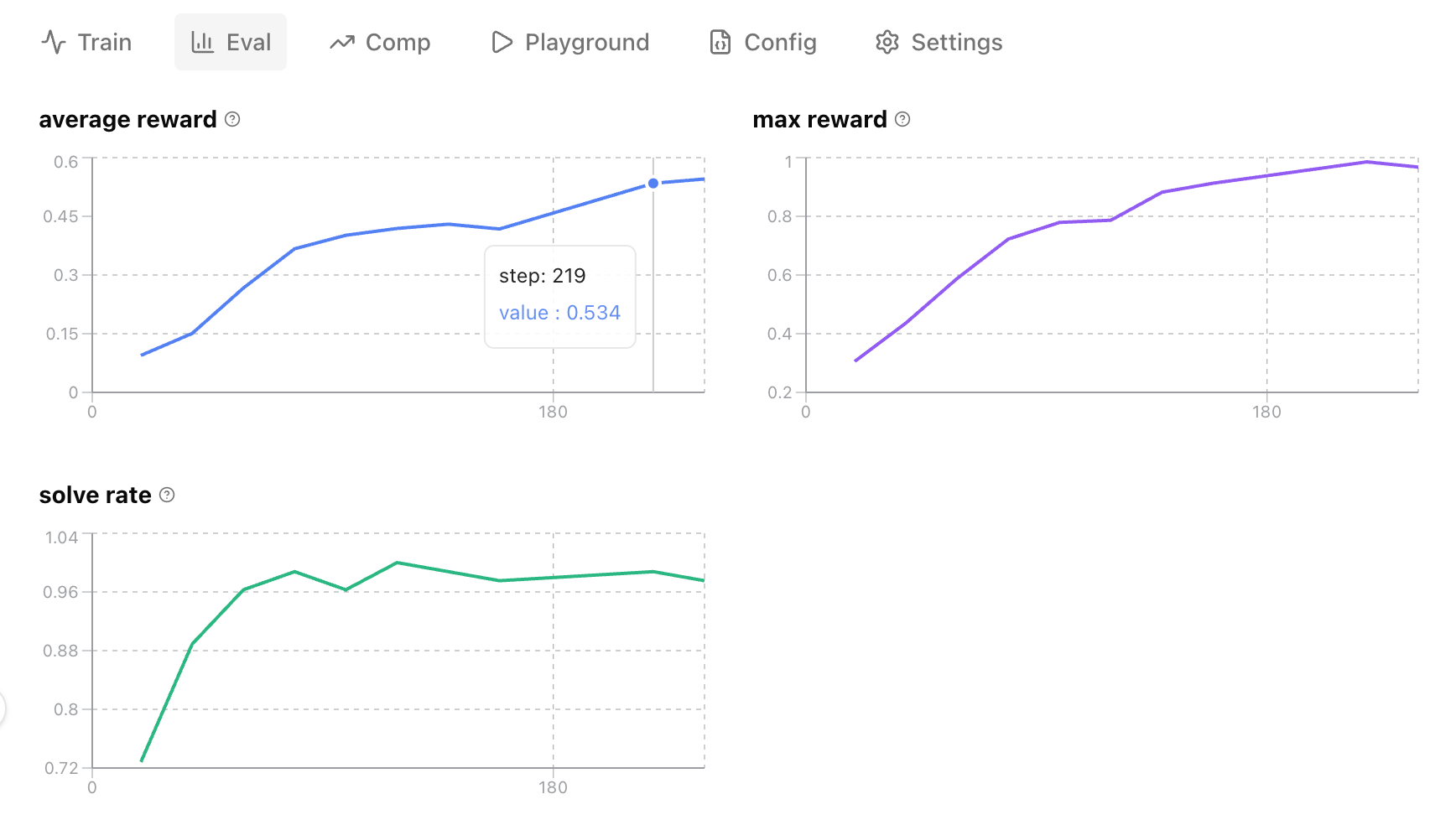
eval runs periodically during training (controlled by eval_interval in your training parameters; it defaults to every 20 steps). hover over any point to see the exact step and value. subreward breakdowns appear in collapsible sections below, just like on the train tab.
what to look for:
- train reward rising, eval reward flat or declining: the model is overfitting to the training distribution. try a larger or more diverse eval set, or stop training earlier.
- train and eval rewards rising together: healthy. the model is generalizing.
- eval reward higher than train: unusual but possible if your eval set is easier than your training set. check your data split.
benchmarks
a benchmark runs your evaluation dataset through an external model and compares the results side by side.
running a benchmark
- go to the benchmark tab on your training run page.
- select a model from the dropdown.
- click start external eval.
the batch runs asynchronously. progress updates every few seconds. once complete, you’ll see:
- bar chart: your model (green) vs the comparison model (gray) on each reward component.
- performance summary: a percentage delta with a label (“outperformed”, “closing in”, or “comparison model leads”).
- per-rollout comparison table: expand any row to see the full conversation for both models side by side.
you can benchmark against several models. toggle between them using the chips above the chart.
interpreting results
benchmarks use the same reward function as training, so scores are directly comparable. keep in mind that scores are relative to your reward function, not absolute quality. what matters is the delta between your model and the baseline.
playground
the playground lets you chat with your trained model interactively. useful for qualitative testing: checking tone, reasoning quality, and edge cases that metrics won’t capture.
model types
| type | what it connects to | when to use |
|---|---|---|
| debug | live tunnel to in-progress training | test the model mid-training |
| eval | latest checkpoint on castform inference | test after training completes |
| external | any external model | manual comparison |
the playground supports up to 4 conversation turns and 8 tool calls per turn. responses stream in real time.
using the playground
- go to the playground tab on your training run page.
- select a model type from the dropdown.
- type a prompt and send.
if your environment has tools (e.g. a search tool for RAG), the model can call them during the conversation. tool calls and results appear inline in the chat.
what to evaluate
| question | where to look |
|---|---|
| is the model overfitting? | compare train tab vs eval tab metrics |
| is it better than the base model? | run a benchmark against the base |
| is it better than external models? | run a benchmark against an external model |
| does it handle edge cases? | test manually in the playground |
| is it using tools correctly? | check tool calls in rollout details and playground |
| are rewards gaming the system? | inspect high-reward rollouts for reward hacking |
next steps
- managing training runs: detailed metrics, rollout inspection, health indicators
- serving + sharing: deploy your model once you’re satisfied with the results