
tl;dr
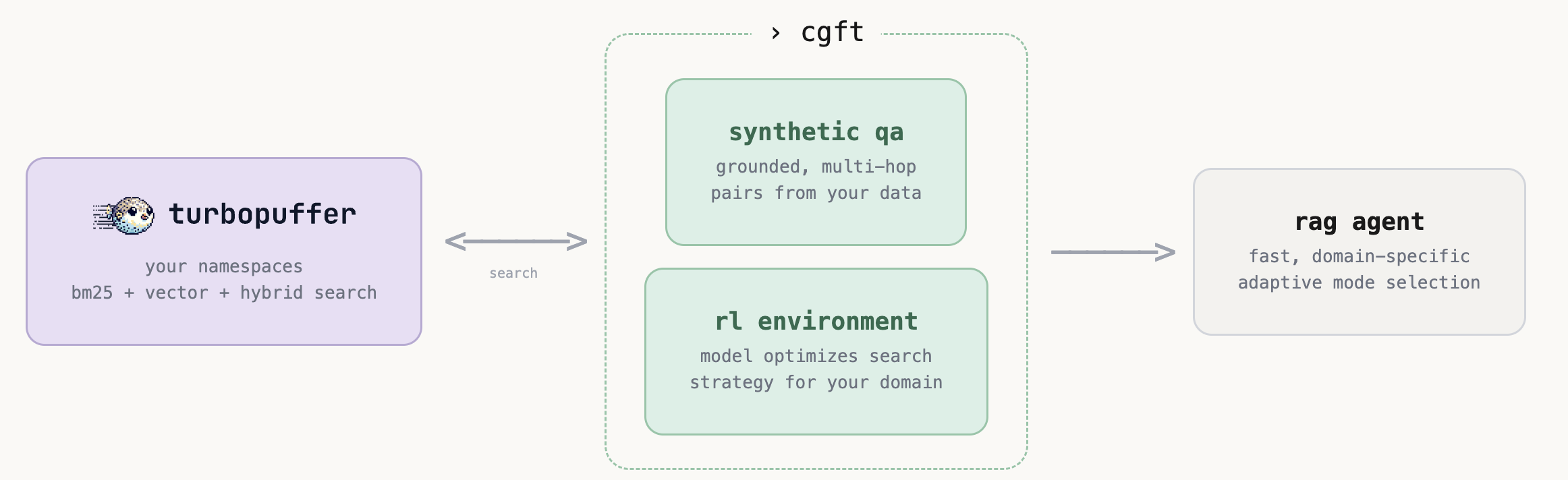
- we integrated turbopuffer, a serverless vector and full-text search database, into our rl training pipeline
- if your data is already on turbopuffer, you can now train rl agents on it with zero data migration.
- our qa gen pipeline and environments support turbopuffer’s different search modes and filtering options.
- to highlight the performance, we trained a rag agent on the concurrentqa dataset using turbopuffer.
why turbopuffer
turbopuffer has become a popular choice for ai and rag applications as it delivers vector and full-text search at a fraction of the cost of traditional in-memory systems. it scales to billions of vectors without the infrastructure headaches.
we integrated it so that:
- our training environments scale, supporting larger corpuses and the need for models to issue thousands of queries per training run.
- if you use turbopuffer already, you can easily train rl agents on your existing namespaces without migrating a single document.
- you can fine tune a model to learn to optimize more advanced queries utilizing the different search modes and metadata filtering that your specific corpus supports.
how do i use it
it’s as simple as plug-and-play with our standard pipeline. We extended our pipeline to be backend agnostic, so everything will work out of the box as long as you
1. point to your namespace
tpuf_source = TpufChunkSource(
    api_key=TURBOPUFFER_API_KEY,
    namespace="my-docs")
2. generate training data — our pipeline generates grounded, multi-hop qa pairs directly from your namespace. no data export.
pipeline = Pipeline(cfg, source_factory=lambda _cfg: tpuf_source)
result = pipeline.run()
3. easily setup environments that support search modes + filters — we created a default TpufSearchEnv that gives the model a search tool backed by turbopuffer’s search modes (bm25, vector, hybrid) and metadata filters.
the environment auto-detects your namespace’s capabilities — if you have vectors, vector and hybrid modes are exposed. filters support field-level operations and logical combinators, so the model can form advanced queries to narrow results by metadata like authors, date range, or document type. depending on your task, the model can even learn to optimize between these different operations and filters to best navigate your data.
experiment_id = train(
    env_class=TpufSearchEnv,
    env_args={
        "turbopuffer_api_key": TURBOPUFFER_API_KEY,
        "namespace": "my-docs",
        "embed_fn": embed_fn,
    },
    ...,
)
for more detailed information on integrating turbopuffer and extending it for your use case, take a look at our integration docs.
a case study: different search modes
we trained on concurrentqa — 100k paragraphs across enron emails and wikipedia, with multi-hop questions that require retrieving from both domains. the model gets a search tool with mode selection (bm25, vector, hybrid), source filtering, and metadata filters. all it gets is a reward signal — no instructions on when to use which mode.
here’s what happened.
the model learns that vector search handles semantic queries. early in training, the model tries bm25 for everything — including questions about similarity and conceptual relationships, where keyword matching falls short. later, it learns to follow up with vector search for the semantic part of the query.
the model learns which source needs which mode. asked when a company was founded — early on, it does a single bm25 search on enron, finds the company, and hallucinates the founding year. later, it learns a two-step strategy: bm25 on enron to identify the entity, then vector on wikipedia for the factual lookup.
search mode distribution
zooming out across all rollouts over 100+ training steps, the trained model converges from largely not explicitly defining search mode to: ~85% bm25, ~7% vector, ~3% hybrid. the model learned that bm25 is effective for this corpus as concurrentqa’s questions were constructed from entity-overlapping passage pairs, making most queries naturally suited to keyword matching. however, it still learns to reserve vector search for the ~7% of sub-queries where semantic retrieval actually matters, and the model learns to always explicitly specify a mode rather than relying on the default.
what we learned
- the model figures out search strategy on its own. we didn’t tell it when to use bm25 vs vector - it discovered the right patterns purely from the reward signal.
- mode selection is data-dependent. on concurrentqa, bm25 dominates because the questions are entity-heavy. on a different corpus where keywords are harder to match (e.g. legal docs, support tickets), we’d likely see the distribution shift toward vector or hybrid. the point is the model adapts to what is most effective for your data.
- exposing more tools doesn’t hurt. we gave the model bm25, vector, hybrid, source filters, and metadata filters. this corpus didn’t have much useful metadata to filter by, but it learned quickly to ignore what doesn’t help and use what does.
get started
- rag demo wizard — working rag example
- integration docs: setup, content attributes, limitations
- castform platform — launch training, monitor training runs, evaluate models
want to train retrieval agents like this on your turbopuffer data? our platform will help you go from namespace to trained model. join the waitlist to get free early beta access.